Rule Actions
Rules support several actions in addition to opening a profile, such as rewriting the URL. Click Add Action to add one.
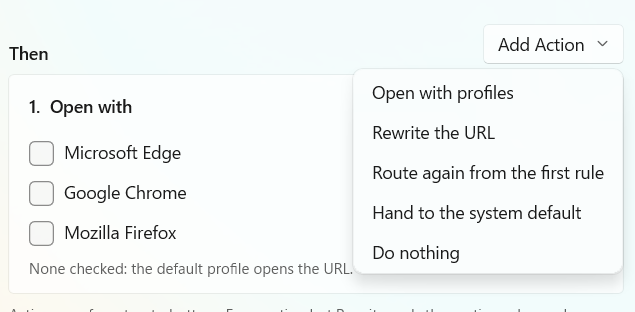
You can add multiple actions. There are two types: actions that end processing, and actions that continue to the next action. For example, Open with profiles ends processing, while Rewrite the URL continues to the next action.
Open with profiles
Opens the URL with the selected profiles. This action ends processing.
Rewrite the URL
Rewrites the incoming URL using one of two methods:
- Replace with a regular expression
- Use a query parameter as the URL
- For example, extract the value of
urlfrom a query such as?url=https%3A%2F%2Fmysite.example%2F&foo=bar.
- For example, extract the value of
This action continues to the next action.
Route again from the first rule
Starts evaluating rules again from the beginning. Use this when, for example, you want to re-evaluate the rules after rewriting the URL. This action ends processing.
Hand to the system default
Passes the URL to the OS handler. This lets the OS handle URLs that Preferis cannot open, such as a URL rewritten to use a custom scheme. This action ends processing.
Do nothing
Does nothing with the incoming URL and ends the rule's action processing. This action ends processing.